Extracting information from MP3 files.
If you deal with MP3 files, you probably know about MP3 tags. These are metadata, included within the MP3 file, that contains information such as the performing artist, the title of the album, the number and title of the track, the music genre, the release year, etc. MP3 tags are commonly called media metadata. MP3 files also contain audio metadata (metadata concerning the audio encoding and format): MP3 version and level, bitrate, sampling, audio channels, etc.
On recent versions of MS Windows, you can view and edit the media metadata in Windows File Explorer. This tutorial shows how to extract the tag information from an MP3 file using Free Pascal. It also shows a way to calculate the play duration of an MP3 file. Please, note that:
- the tutorial does not deal with setting MP3 tags;
- the tutorial applies to ID3 tags only. Other tag specifications are not supported.
There are several Free Pascal units dealing with MP3 tags available. The tutorial ID3v2.pas. Unfortunately, I don't remember, what website I downloaded it from (?). Anyway, the original source and the modified source (cf. further down in the text) are included in the ZIP archive containing the sources of the tutorial samples. To use the unit, just place ID3v2.pas in your Lazarus project folder.
You extract the value of the different MP3 tags by creating a TID3v2 object, using this object's
ReadFromFile method to specify the MP3 file, and then read this object's properties.
Here is the code of a procedure that extracts the MP3 title (this normally corresponds to the track title; if your file is a full album, you probable set it to the album
title, eventually followed by something like "[album]"), the artist name, the album title, the music genre, the release year, and the track number:
{ Read MP3 tags (using the ID3v2 unit) }
procedure ReadMP3Tags(var MP3File: string; out STitle, SArtist, SAlbum, SGenre, SYear, STrack: string);
var
MP3Tags: TID3v2;
begin
MP3Tags := TID3v2.Create;
try
with MP3Tags do begin
ReadFromFile(MP3File);
STitle := Title;
SArtist := Artist;
SAlbum := Album;
SYear := Year;
SGenre := Genre;
STrack := IntToStr(Track);
end;
finally
MP3Tags.Free;
end;
end;
There are some other tags available as properties of the TID3v2 objects, as for example "comments", and "copyright".
Here is the code of the program sample mp3a.lpr. It asks for the MP3 filename, and displays the MP3 information, read from the file's
tags:
program mp3a;
{$mode objfpc}{$H+}
uses
SysUtils, ID3v2;
var
FName, Title, Artist, Album, Genre, Year, Track: string;
procedure ReadMP3Tags(var MP3File: string; out STitle, SArtist, SAlbum, SGenre, SYear, STrack: string);
...
begin
repeat
Writeln; Write('Enter filename? '); Readln(FName);
if FName <> '' then begin
ReadMP3Tags(FName, Title, Artist, Album, Genre, Year, Track);
Writeln(' ', Album, ' by ', Artist, ' (released in ', Year, '):');
Writeln(' Music genre = ', Genre);
Writeln(' Track title = ', Track, '. ', Title);
end;
until FName = '';
Writeln;
end.
And here is the screenshot of an execution of the program (using the original ID3v2 unit).
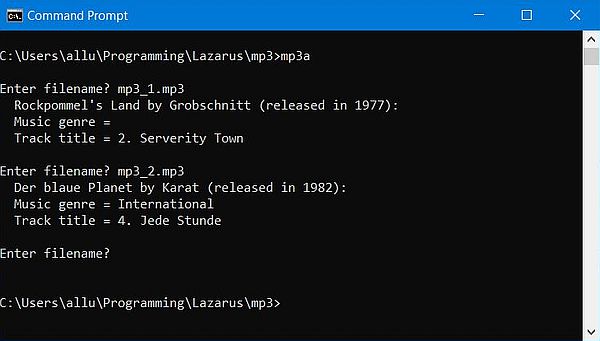 |
The screenshot shows that there is only a genre displayed for the second MP3 file. The reason is not because this tag isn't set in the first file (it's actually set to "Progressive Rock"), nor is there any relationship with the space in the genre name. In fact, there are some important points to consider here:
- The music genre is stored in the MP3 file using the metadata tag "TCON". The value of this tag is usually a number between parentheses, this number (ranging from 1 to 147) identifying a predefined (standard) music genre. Example: For the genre "Progressive Rock", the "TCON" tag is set to "(92)".
- If we use a not predefined music genre when tagging the MP3 file (as in mp3_2.mp3, where I use the custom genre "International"), the genre is stored as the string entered. That's why the program displays a music genre for the second file.
- Why the program doesn't display anything at all as music genre for the first file (in other words: why doesn't it display "(92)") is a good question. I, personally, think that this is a bug in the code of the ID3v2 unit. (?)
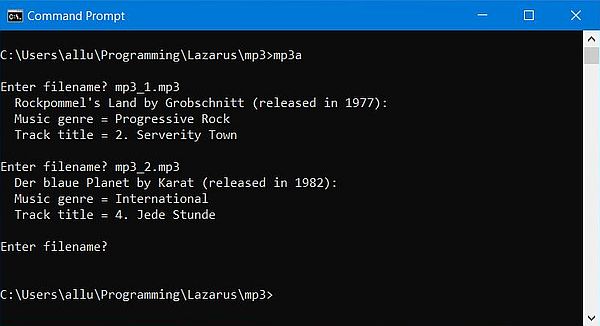
To get the music genre as a significant string for both standard and custom genres, I modified the code of the ID3v2 unit, as follows:
- I added an array declaration, the array indexes being the official code for the standard music genres, and the array element values being the music genres as strings.
- I modified the ExtractGenre function, testing if the genre tag value ends with a closing parenthesis. If so, I consider the value stored as a standard genre, and the function returns the array element corresponding to the code indicated between parentheses. If not, I consider the value stored as a custom genre, and the function returns the value stored.
Here is the code of my standard music genres array declaration:
const
ID3Genres: array[0..147] of string[32] = (
'', 'Classic Rock', 'Country', 'Dance', 'Disco', 'Funk', 'Grunge', 'Hip-Hop', 'Jazz', 'Metal', 'New Age', 'Oldies',
'Other', 'Pop', 'R&B', 'Rap', 'Reggae', 'Rock', 'Techno', 'Industrial', 'Alternative', 'Ska', 'Death Metal', 'Pranks',
'Soundtrack', 'Euro-Techno', 'Ambient', 'Trip-Hop', 'Vocal', 'Jazz&Funk', 'Fusion', 'Trance', 'Classical', 'Instrumental',
'Acid', 'House', 'Game', 'Sound Clip', 'Gospel', 'Noise', 'Alternative Rock', 'Bass', 'Soul', 'Punk', 'Space', 'Meditative',
'Instrumental Pop', 'Instrumental Rock', 'Ethnic', 'Gothic', 'Darkwave', 'Techno-Industrial', 'Electronic', 'Pop-Folk',
'Eurodance', 'Dream', 'Southern Rock', 'Comedy', 'Cult', 'Gangsta', 'Top 40', 'Christian Rap', 'Pop/Funk', 'Jungle',
'Native US', 'Cabaret', 'New Wave', 'Psychedelic', 'Rave', 'Showtunes', 'Trailer', 'Lo-Fi', 'Tribal', 'Acid Punk',
'Acid Jazz', 'Polka', 'Retro', 'Musical', 'Rock & Roll', 'Hard Rock', 'Folk', 'Folk-Rock', 'National Folk', 'Swing',
'Fast Fusion', 'Bebob', 'Latin', 'Revival', 'Celtic', 'Bluegrass', 'Avantgarde', 'Gothic Rock', 'Progressive Rock',
'Psychedelic Rock', 'Symphonic Rock', 'Slow Rock', 'Big Band', 'Chorus', 'Easy Listening', 'Acoustic', 'Humour', 'Speech',
'Chanson', 'Opera', 'Chamber Music', 'Sonata', 'Symphony', 'Booty Bass', 'Primus', 'Porn Groove', 'Satire', 'Slow Jam',
'Club', 'Tango', 'Samba', 'Folklore', 'Ballad', 'Power Ballad', 'Rhythmic Soul', 'Freestyle', 'Duet', 'Punk Rock',
'Drum Solo', 'A capella', 'Euro-House', 'Dance Hall', 'Goa', 'Drum’n’Bass', 'Club-House', 'Hardcore', 'Terror', 'Indie',
'BritPop', 'Negerpunk', 'Polsk Punk', 'Beat', 'Christian Gangsta', 'Heavy Metal', 'Black Metal', 'Crossover',
'Contemporary Christian', 'Christian Rock', 'Merengue', 'Salsa', 'Thrash Metal', 'Anime', 'JPop', 'SynthPop'
);
And here is the code of my modified ExtractGenre function:
function ExtractGenre(const GenreString: string): string;
var
ResultI, Code: Integer;
Result0: string;
begin
Result := GetANSI(GenreString); Result0 := Result;
if Pos(')', Result0) = Length(Result0) then begin
Result0 := StringReplace(Result0, '(', '', []);
Result0 := StringReplace(Result0, ')', '', []);
Val(Result0, ResultI, Code);
if (Code = 0) and (ResultI <= 147) then
Result := ID3Genres[ResultI];
end;
end;
The screenshot shows the execution of the program mp3a.exe, using the modified ID3v2 unit.
 |
Calculating the play duration of an MP3 file.
The ID3v2 unit doesn't include any features concerning the play duration. I suppose that there are other MP3 related units available on the Internet, that can be used to do extract it. An alternative is to write our own unit form scratch: Reading the MP3 as a file of byte and searching for the information that we need to calculate the play duration. Calculating it, not extracting it: The metadata of MP3 files does not include any direct information about the play duration.
The calculation of the play duration is rather simple: Just multiplying the file size (that we can retrieve with the SysUtils function FileSize) by the bitrate (that we can retrieve from the MP3 audio metadata). However, calculating the play duration only works correctly if the MP3 is encoded with a constant bitrate (CBR). In fact, there are MP3 files that use a variable bitrate (VBR). Such MP3 files are not considered in this tutorial.
The structure of MP3 files is rather complex, and its details are outside the topics of this tutorial. For details concerning the MPEG audio specifications, the article MPEG Audio Frame Header at mpgedit.org should be helpful. If you want to know everything about MP3, the O'Reilly book MP3: The Definitive Guide might be what you need; it is available on the Internet as PDF. I'll give here only a basic overview of the structure of MPEG audio files; just enough to understand the code of my unit mpegAudioDuration, that you can use to extract the play duration from .mp1, .mp2, and .mp3 files.
MPEG audio files are built up from smaller parts called frames. If you want to read the information concerning an MPEG audio file, it's normally enough to find the first frame, read its header and assume that the other frames are the same. To note, that this is only the case for files with constant bitrate (CBR)!
The frame header is constituted by the first four bytes (32 bits) in a frame. The first eleven bits of a frame header are called frame sync and are always all set. Therefore, to find the first frame, you can search through the file for the first occurrence of the frame sync, i.e. search for a byte with a value of 255, followed by a byte with its three most significant bits set.
Note: There are cases, where the frame sync length is 12 bits. My unit does not consider this situation...
After the 11 bits of the frame sync (position: 31-21), there are two bits (position: 20-19) that indicate the MPEG audio version: 00 = MPEG-2.5; 10 = MPEG-2; 11 = MPEG-1.
The following two bits (position: 18-17) describe the MPEG audio layer: 01 = Layer III; 10 = Layer II; 11 = Layer I.
Note: What we commonly call MP3, refers either to MPEG-1 audio layer III or MPEG-2 audio layer III.
Knowing the MPEG audio version and layer is mandatory to extract the bitrate. In fact, the bitrate is a four bits value (position: 15-12), that is an index to one of five tables (with the actual bitrate values). Which table has to be actually used depends on the MPEG audio version and layer. For details, cf. MPEG Audio Frame Header at mpgedit.org.
With the elements described above, we have all that we need to calculate the play duration of our MP3 files. However, wouldn't it be nice, if we could detect files encoded using CBR (and warn that the duration calculated is very probably not correct, if we aren't sure about that)?
MP3 files may include an (optional) header, called a Xing header. Identified by the string 'Xing', it mostly (always?) indicates that the file is encoded using VBR. Similarly, files encoded using CBR may have a header identified by the string 'Info'. Thus, we can search at the beginning of the file for this string; if we find it, we can be sure that the play duration calculated is correct. If, instead, we find the string 'Xing', we can assume that the duration returned is false. If the file doesn't contain any of the two strings, the duration calculated may, or may be not correct.
You can use my unit mpegAudioDuration without caring about all this theoretical stuff above. Considering the unit as a "black box", just call the procedure GetMpegAudioDuration. As input, indicate the name of the MP3 file, and the time unit ('s', 'm', ''h) that you want the play duration to be returned. The output parameters of the procedure are the play duration (as real number, and as formatted string) and a return code that, if different from 0, indicates that there was an error (positive return code) or other problem (negative return code). To get the error message for a given return code, call the function MpegAudioErrorMessage.
The code of the unit is some 400 lines, too long to publish here. Click the following link to display the source code of the unit in a new browser tab.
The program sample mp3b.lpr asks the user for the name of an MP3 file, and displays its play duration. Here is the code:
program mp3b;
{$mode objfpc}{$H+}
uses
mpegAudioDuration;
var
ErrCode: Integer;
Duration: Real;
FName, SDuration: string;
begin
repeat
Writeln; Write('Enter filename? '); Readln(FName);
if FName <> '' then begin
GetMpegAudioDuration(FName, 'h', Duration, SDuration, ErrCode);
if ErrCode <= 0 then begin
Writeln(' Play duration = ', SDuration);
if ErrCode < 0 then
Writeln('Warning: ', mpegAudioErrorMessage(ErrCode));
end
else begin
Writeln('Error when trying to calculate play duration:');
Writeln(mpegAudioErrorMessage(ErrCode));
end;
end;
until FName = '';
Writeln;
end.
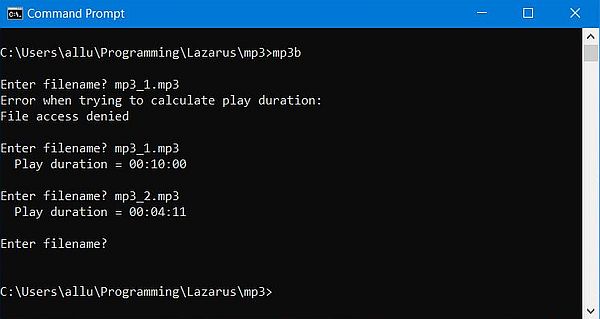
Here is a screenshot of the program execution. The "File access denied" error occurred on my Windows 10, because the file was set to read-only. Actually, no logic in that, because the file is opened for reading only (?).
 |
If you find this text helpful, please, support me and this website by signing my guestbook.